Your IT Is Working. But Is It Actually Helping Your Business?
Your technology may be working, but is it improving productivity, reducing risk and supporting growth? Learn how to evaluate the real business value of IT.

In this article
- “Is It Working?” Is the Wrong Question
- Most IT Environments Weren’t Designed
- The Hidden Cost of “Good Enough”
- Technology Should Reduce Friction
- More Technology Isn’t Necessarily Better
- IT Maturity Isn’t About Having the Newest Technology
- Reactive IT vs. Strategic IT
- Cybersecurity Is Part of the Same Conversation
- Then There Is AI
- So, Is Your IT Actually Helping Your Business?
- Technology Should Move the Business Forward
- Is Your Technology Moving Your Business Forward?
For many businesses, the definition of good IT is surprisingly simple:
Nothing is broken.
Email works. Employees can access their files. Teams meetings connect. Computers turn on. The internet is available. The accounting system is running.
So IT must be fine.
But there is an important difference between technology that works and technology that actually helps the business perform better.
A company can have perfectly functional technology while employees waste hundreds of hours every year on manual processes, information is scattered across multiple systems, cybersecurity risks remain hidden, software subscriptions continue accumulating, and management has little idea whether its technology investment is actually delivering value.
Everything can be working exactly as designed — and the technology environment can still be holding the business back.
That is the difference between IT support and IT strategy.
“Is It Working?” Is the Wrong Question
Traditional IT has often been measured by uptime.
Servers running? Check. Email available? Check. Backups completed? Check. Help desk tickets resolved? Check.
Those things remain important. Reliable technology is fundamental to running a modern business. But reliability should be the starting point, not the objective.
Business leaders should be asking a different set of questions:
- Does our technology make our employees more productive?
- Are we paying for systems or applications that duplicate functionality we already own?
- Can our employees work securely from wherever they need to work?
- Are people repeatedly performing tasks that could be automated?
- Can management easily access the information it needs to make decisions?
- Could the business continue operating if a critical system failed tomorrow?
- Are our cybersecurity controls appropriate for the risks we face?
- Can our technology support the business we expect to become three years from now?
Those questions reveal far more about the health of an organization’s technology environment than whether someone’s laptop worked this morning.
Most IT Environments Weren’t Designed
One of the most common technology problems isn’t caused by bad technology. It’s caused by evolution.
Businesses rarely design their entire technology environment from scratch. Instead, technology accumulates.
Someone needs a particular capability, so the company purchases an application. A department needs somewhere to store documents, so another platform is introduced. The business grows and a server is added. Microsoft 365 is implemented. Teams arrives. SharePoint appears. Cloud applications multiply. A cybersecurity concern results in another security product. Another department subscribes to a different SaaS platform.
None of those decisions may be wrong individually.
But five or ten years later, the organization can find itself operating dozens of technologies that were never intentionally designed to work together.
The result is often complexity that nobody planned.
The Hidden Cost of “Good Enough”
Technology problems don’t always announce themselves with an outage.
Sometimes they look like an employee spending 20 minutes every morning transferring information from one system into another. Or a manager manually compiling five spreadsheets to produce a monthly report. Or employees emailing documents back and forth because nobody is quite sure where the authoritative version is stored. Or a company paying for a third-party application that duplicates functionality already included in Microsoft 365.
Individually, these problems can seem insignificant. Across an organization, they can become expensive.
If 20 employees each lose just 15 minutes per working day because of inefficient systems or processes, that represents roughly 1,250 hours of lost productivity every year.
And nobody necessarily reports an IT problem. Nothing is technically broken. The inefficiency simply becomes part of how the organization works.
That is why some of the most expensive technology problems never generate a help desk ticket.
Technology Should Reduce Friction
One of the best ways to evaluate technology is to look for friction.
Where do employees complain about processes? Where is information entered more than once? Where are spreadsheets being used as databases? Where do people maintain their own copies of documents? Where does someone have to remember to perform a repetitive task? Where does a process stop because it requires one particular employee? Where does management struggle to obtain reliable information?
These are not always IT problems. They are business problems that technology may be able to solve.
That distinction matters. The objective should never be to introduce technology simply because the technology exists. The objective is to remove unnecessary friction from the business.
Sometimes the answer is automation. Sometimes it’s integration. Sometimes it’s better use of Microsoft 365. Sometimes it’s replacing an aging application. And sometimes the right answer is simply changing the process.
Good IT strategy starts with the business problem — not the product.
More Technology Isn’t Necessarily Better
The technology industry is very good at selling technology. There’s always another platform, security product, AI service, cloud application or productivity tool promising to transform the organization.
But many businesses don’t actually need more technology. They need to make better use of what they already own.
Microsoft 365 is a good example. Many organizations primarily think of Microsoft 365 as email, Word, Excel and Teams. Yet depending on licensing, the Microsoft ecosystem can potentially provide capabilities around document management, collaboration, identity, device management, security, automation, analytics and increasingly artificial intelligence.
An organization can therefore continue purchasing additional technology while simultaneously underutilizing technology it already pays for.
Before asking, “What should we buy?” it is worth asking, “What do we already have?” followed by, “Are we using it effectively?”
Those two questions can produce surprisingly valuable answers.
IT Maturity Isn’t About Having the Newest Technology
A mature IT environment isn’t necessarily the organization with the newest laptops, the largest cloud environment or the most sophisticated collection of software.
IT maturity is about alignment.
Technology should align with the organization’s business objectives, operational processes, security requirements, regulatory obligations, workforce, financial priorities and growth plans.
A highly sophisticated technology environment that doesn’t support the way the business operates isn’t mature. It’s simply complicated.
Conversely, a relatively simple technology environment can be extremely mature if it is secure, manageable, well documented and appropriate for the business it supports.
The goal isn’t complexity. The goal is intentionality.
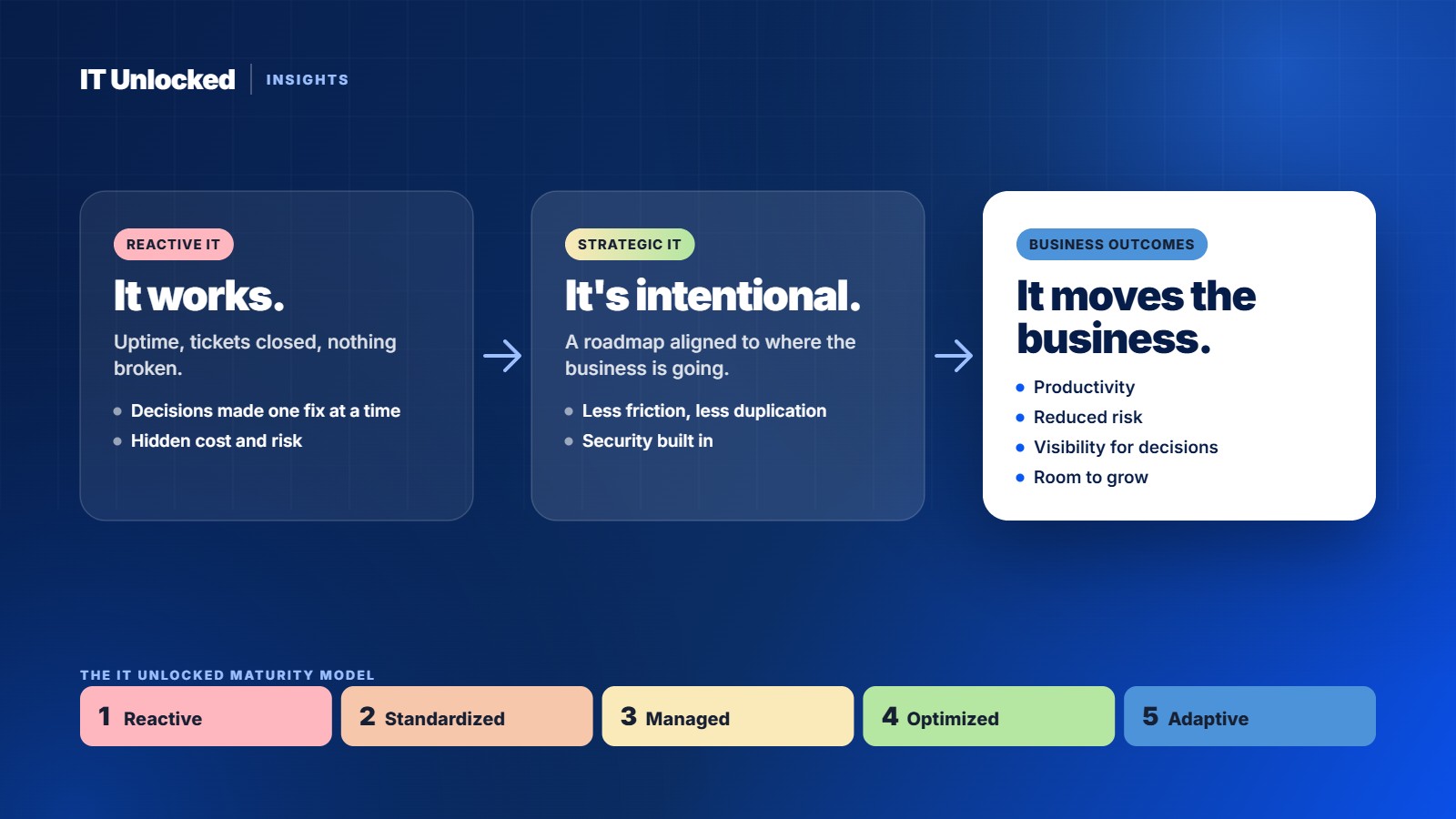
- 1ReactiveTechnology responds to problems after they occur
- 2StandardizedBasic standards, processes and repeatability are established
- 3ManagedTechnology is actively governed and measured
- 4OptimizedTechnology is optimized for performance and business value
- 5AdaptiveTechnology actively enables strategy, innovation and change
Reactive IT vs. Strategic IT
Another useful indicator of IT maturity is how technology decisions get made.
In a reactive environment, a server runs out of capacity and more storage is purchased. A security incident occurs and another security product is added. Employees can’t collaborate effectively and another application is purchased. A system reaches end of life and it gets replaced.
Each decision solves an immediate problem, but there may be no broader direction connecting those decisions.
Strategic IT works differently. Instead of asking only what needs fixing today, leadership develops a technology roadmap based on where the business is going.
Is the company expecting significant growth? Opening additional locations? Acquiring another business? Moving toward remote or hybrid work? Introducing AI? Facing new compliance requirements? Trying to reduce operational costs? Planning to retire legacy applications?
Those business decisions should influence technology decisions before they become urgent.
IT should not constantly be trying to catch up with the business. It should be helping prepare the business for what comes next.
Cybersecurity Is Part of the Same Conversation
Security is sometimes treated as a separate technology discussion. It shouldn’t be.
The way an organization stores information, manages identities, provisions employees, configures devices, uses cloud applications and controls administrative access all affect cybersecurity.
The same is true of business continuity. Having backups is important. Knowing that those backups can actually restore the systems the business depends on is considerably more important.
Technology strategy therefore needs to consider productivity, security, resilience and cost together.
Optimizing one while ignoring the others can create entirely new problems.
Then There Is AI
Artificial intelligence is making this conversation even more important.
Organizations are understandably asking how they can use tools such as generative AI and Microsoft Copilot. But AI doesn’t eliminate the need for good technology foundations. It increases it.
If information is scattered across poorly managed systems, permissions are inconsistent, business processes are undefined and data quality is poor, adding AI doesn’t automatically solve those problems. In some cases, it exposes them.
Before asking where AI should be deployed, organizations should understand their data, systems, processes and security.
The question shouldn’t simply be, “How do we use AI?” It should be, “Where can technology — including AI — create measurable value for this business?”
That is a very different conversation.
So, Is Your IT Actually Helping Your Business?
There’s a simple exercise leadership teams can perform.
Forget about technology products for a moment. Instead, ask: What are the five biggest operational frustrations in our business today?
Then ask: Could technology eliminate or reduce any of them?
You may discover that the most valuable technology project for the next year isn’t replacing a server or purchasing another application. It might be eliminating a manual process that consumes hundreds of employee hours, improving access to management information, consolidating redundant systems, strengthening identity security, automating employee onboarding, making better use of Microsoft 365, or simply developing a technology roadmap so that the next investment is deliberate rather than reactive.
Technology Should Move the Business Forward
Keeping technology operational remains important. But businesses should expect more from IT than simply keeping the lights on.
Technology represents a significant investment in almost every modern organization. That investment should improve productivity, reduce risk, create visibility, enable growth and make the organization easier to operate.
The goal isn’t to have more technology.
The goal is to have the right technology, properly implemented, aligned with where the business is going.
So perhaps the next time someone says, “Our IT is working fine,” the response should be:
“That’s good. But what is it doing for the business?”
Is Your Technology Moving Your Business Forward?
IT Unlocked helps organizations look beyond day-to-day IT support and understand the bigger picture — what technology they have, where the gaps are, what is creating unnecessary cost or risk, and what should happen next.
Start by understanding where you are today. Then build a practical roadmap for where you need to go.